

Overview
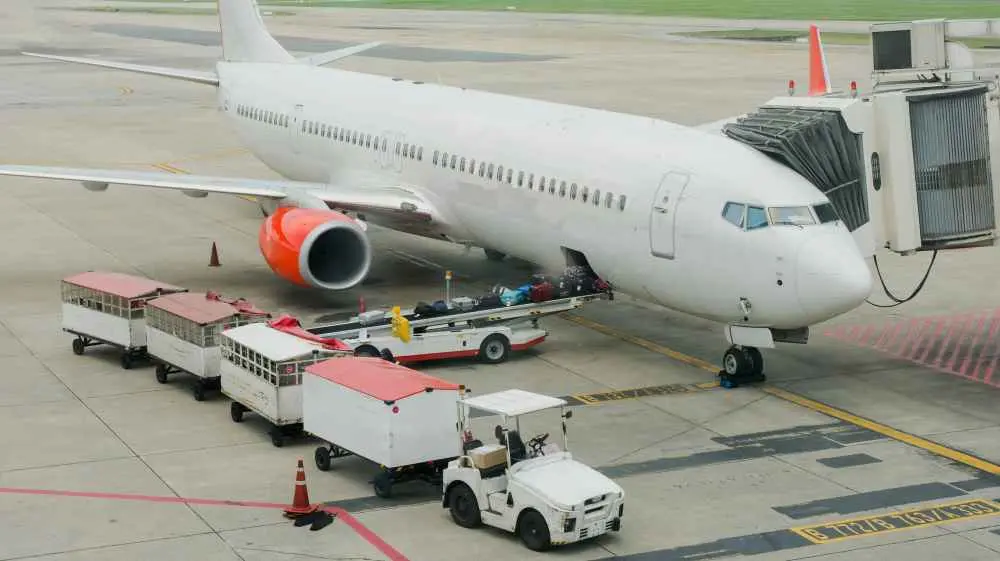
It does not sound easy when air freight forwarding is mentioned. Airplanes, luggage, storage facilities, documents, it is not nothing. However, when you step through the procedure one step at a time, then it becomes easy to comprehend. Each stage has a purpose. Each document matters. And both parties contribute to the transgression of your cargo through origin to destination.
- Overview
- Key Takeaways
- Complete Air Freight Forwarding Steps
- Step 1: Shipment Planning and Quotation
- Step 2: Booking Space with the Airline
- Step 3: Cargo Pickup and Warehouse Handling
- Step 4: Documentation Preparation
- Step 5: Export Customs Clearance
- Step 6: Cargo Build-Up and Airline Handling
- Step 7: Air Transportation
- Step 8: Arrival and Import Customs Clearance
- Step 9: Final Delivery to Consignee
- Why Businesses Choose Air Freight Over Other Modes
- Who Is Involved in the Air Freight Forwarding Process?
- Key Air Freight Documents Explained
- How Air Freight Costs Are Calculated
- Real Example: How a Shipment Moves from China to USA
- Common Mistakes in Air Freight Forwarding
- How to Reduce Air Freight Costs
- FAQs About the Air Freight Forwarding Process
- Conclusion
This guide has been designed and prepared for you to understand the whole process of air freight forwarding step by step, from the shipment of your first international shipment, or just to familiarize yourself with all aspects of the trade.
Key Takeaways
- Air freight follows a clear step-by-step process from planning to delivery
- Accurate documentation and early booking prevent most delays
- Speed and reliability make air freight ideal for time-sensitive cargo
Complete Air Freight Forwarding Steps
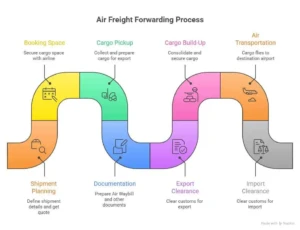
Air freight forwarding follows a structured path. Nothing moves randomly. A series of planning, coordination and clearance steps are required for every shipment until it is delivered to the final consignee.
Step 1: Shipment Planning and Quotation
Planning really forms the basis of everything. Firstly, a shipper gives information regarding the shipment such as the nature of goods, weight, dimensions, pick-up location and destination. A freight forwarder, taking all these inputs into account, will calculate the chargeable weight and send you a quote.
This step sets expectations around cost, transit time, and service level. If information is inaccurate here, problems can show up later. Clear planning reduces surprises.
Step 2: Booking Space with the Airline
After the quote is accepted, the forwarder will arrange the booking of cargo space with an airline. By the way, weeks before the date, airlines will have only a limited amount of space especially during the peak period. The earlier you make your booking the more you get your desired schedule.
First of all, the forwarder chooses the best route depending on the fare, time, and availability of capacity.
Step 3: Cargo Pickup and Warehouse Handling
After cargo has been booked, it is first collected from shipper’s location then sent to a warehouse. Warehouse staff check packing, weigh, and measure cargo, getting it export-ready.
This phase assures the merchandise complies with the airline handling requirements prior to its arrival at the airport.
Step 4: Documentation Preparation
Documentation is a major part of air freight. The forwarder’s job is to create the Air Waybill, commercial invoice, packing list, as well as any required export declarations.
Proper paperwork is the key to avoid customs delays. Small errors can even make your shipment imprisoned at the airport for a long time.
Step 5: Export Customs Clearance
Before a cargo leaves country of origin, it must clear customs for export. The authorities check the documents and ensure that all the rules are followed.
After getting the green light, the cargo is allowed to be taken out of the country.
Step 6: Cargo Build-Up and Airline Handling
Cargo is first consolidated and secured onto airline pallets or containers. This operation is known as build-up. Proper handling not only guarantees a stable load in flight but also greatly reduces the potential for damage.
Airline staff then take custody of the shipment.
Step 7: Air Transportation
The cargo is first loaded onto the plane and then transported to the destination airport. Depending on the route, the goods may be shipped via direct flights or connecting flights.
The best thing about air freight is speed, so if you have urgent or high-value goods, that is perfect for you.
Step 8: Arrival and Import Customs Clearance
Upon arrival, the shipment undergoes import customs clearance. Authorities review documents again and confirm duties or taxes if applicable.
Clear documentation speeds up this process significantly.
Step 9: Final Delivery to Consignee
After the customs clearance is completed, the cargo is given the go-ahead for the final delivery. The forwarder arranges the transportation of the goods from the airport to the consignee’s address.
The shipment is delivered, and proof of receipt confirms completion.
Why Businesses Choose Air Freight Over Other Modes
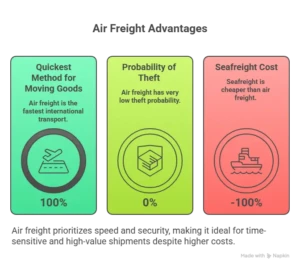
Air freight is the quickest method for moving goods internationally. Particularly if time is a key factor. Different types of goods, like high-value ones, items from urgent orders, medical supplies, and electronics, are the most usual ones to be transported by air.
Additionally, air freight boasts dependable timing and gives very low probability of theft when compared to the other transport modes.Although seafreight is a cheaper option than air freight, the fast turnaround in air freight compensates for the higher price because it is particularly suitable for shipments with very tight deadlines.
Who Is Involved in the Air Freight Forwarding Process?
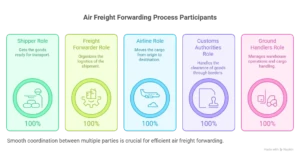
Various parties cooperate in air freight forwarding. The shipper gets the goods ready. The freight forwarder organizes the logistics. Airlines move the cargo. Customs authorities handle clearance. Ground handlers manage warehouse operations.
Each party has a defined role. When coordination works smoothly, the shipment moves efficiently.
Key Air Freight Documents Explained
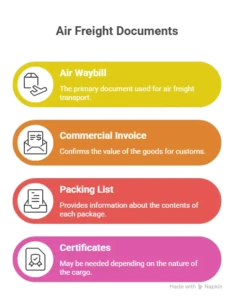
The documentation plays a big role in air freight. The Air Waybill is the primary document used for transport. The commercial invoice also helps customs by confirming the value of the goods. The packing list provides information about the contents of each package.
Depending on the nature of the cargo, some shipments will also need certificates of origin, insurance certificates, or special permits.
How Air Freight Costs Are Calculated
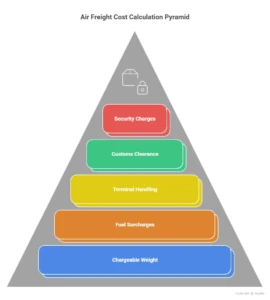
Air freight pricing is based on chargeable weight, which compares actual weight with volumetric weight. The higher value determines the cost.
Other charges that may arise are fuel surcharges, terminal handling fees, customs clearance fees, and security charges. Transparent quotations aid in the avoidance of such unforeseen expenditure.
Real Example: How a Shipment Moves from China to USA

Imagine a shipment of electronics moving from Shenzhen to Los Angeles. The shipper shares cargo details with a forwarder. Space is booked on a flight from Hong Kong. Cargo is collected, documented, and cleared for export.
The shipment flies to Los Angeles, clears US customs, and is delivered to the buyer’s warehouse. The entire process may take three to five days depending on flight schedules and clearance speed.
Common Mistakes in Air Freight Forwarding
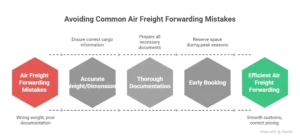
A mistake that is usually made is giving wrong weight or dimensions. This has an influence on price and reservation. The second problem is poor documentation which slows down the process of clearing of customs.
Capacity problems can also be caused by late booking of peak seasons. Most of these challenges can be avoided by planning.
How to Reduce Air Freight Costs
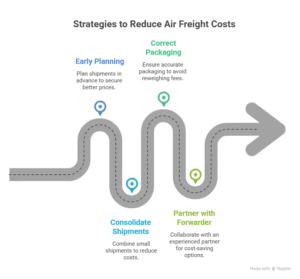
Early shipment planning is likely to result in superior prices. Small shipments could be cheaper with consolidated airfreight. The correct packaging will avoid reweighing fees.
Working together with an experienced forwarding partner also helps in identifying the cost-saving options without cutting down on delivery schedules.
FAQs About the Air Freight Forwarding Process
How long does air freight take?
Transit time usually ranges from one to five days depending on route and customs clearance.
Is air freight secure?
Air cargo follows strict screening and handling procedures, which reduces risk.
What goods are best suited for air freight?
High-value, urgent, or perishable goods often move by air.
Conclusion
Air freight forwarding is a well-structured process that begins with planning and ends with the final delivery. Every stage is involved in making sure the cargo traveling across borders is fast and secure.
When documentation is error-free and there is good coordination among different parties, as well as allowing enough time for planning, air freight is very likely to be one of the most dependable means of transporting goods around the world.
To learn more about air freight forwarding, explore our related blog articles!